Skip to content
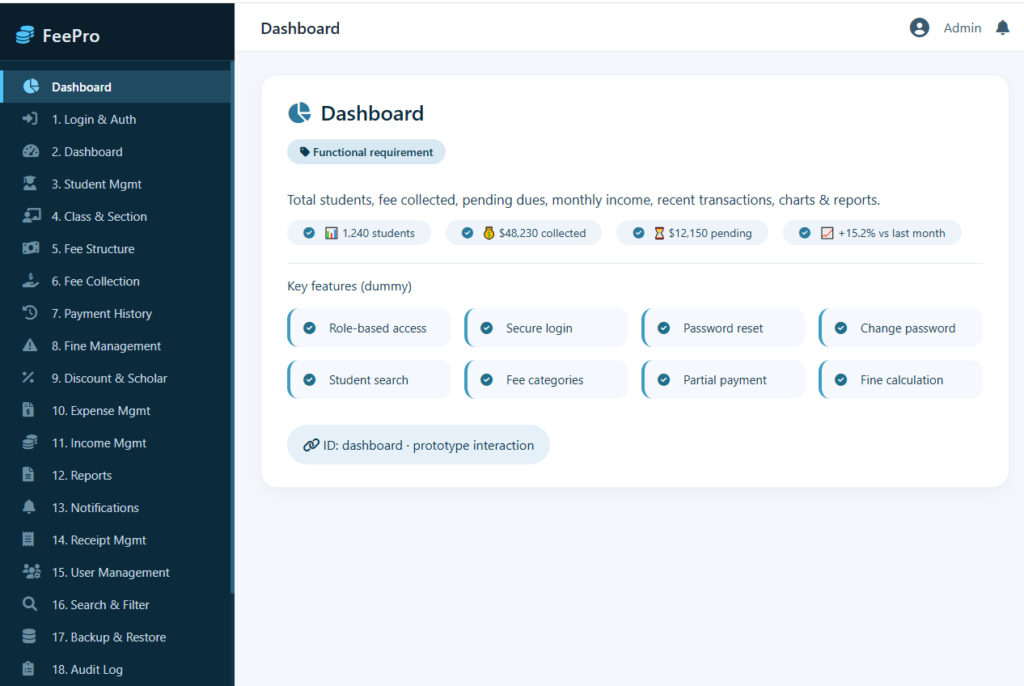
1. Dashboard
- Display total students, fee collected, pending dues, and monthly income.
- Show recent transactions and notifications.
- Display charts and reports.
2.User Login & Authentication
- Allow secure login for Admin, Accountant, Teacher, Student, and Parent.
- Role-based access control.
- Password reset and change password option.
- Secure logout functionality.
3. Student Management
- Add, edit, update, and delete student records.
- Search students by ID, name, class, or section.
- Assign students to classes and sections.
- Store student personal and guardian information.
4. Class & Section Management
- Create, edit, and delete classes.
- Create and manage sections.
- Assign class teachers.
- Set class-wise fee structures.
5. Fee Structure Management
- Create different fee categories (Admission Fee, Tuition Fee, Exam Fee, Transport Fee, Library Fee, Fine, etc.).
- Define monthly, quarterly, or yearly fee plans.
- Apply discounts and scholarships.
- Set due dates and late fee rules.
6. Fee Collection
- Collect student fees.
- Record full or partial payments.
- Support multiple payment methods (Cash, Bank Transfer, Card, Online Payment).
- Generate payment receipts automatically.
- Print or download receipts.
7. Fee Payment History
- Maintain complete payment records.
- View transaction history by student.
- Search payments by date, student, or receipt number.
- Print payment history.
8.Fine Management
- Automatically calculate late payment fines.
- Configure fine amount or percentage.
- Add or waive fines manually.
9.Discount & Scholarship Management
- Assign discounts to individual students.
- Apply scholarships.
- Track concession records.
10. Expense Management
- Record school expenses.
- Categorize expenses.
- Generate expense reports.
- Edit and delete expense entries.
11. Income Management
- Track fee collections.
- Record additional income sources.
- Generate income reports.
12. Reports
- Daily fee collection report.
- Monthly and yearly income report.
- Outstanding fee report.
- Student payment report.
- Class-wise fee report.
- Expense report.
- Profit and loss summary.
13. Notifications
- Send fee reminders before due dates.
- Notify students and parents about successful payments.
- Send overdue payment alerts.
- Display system notifications.
14. Receipt Management
- Generate unique receipt numbers.
- Print receipts.
- Download receipts in PDF format.
- Reprint old receipts.
15. User Management
- Create user accounts.
- Assign user roles and permissions.
- Activate or deactivate user accounts.
- Manage passwords.
16. Search & Filter
- Search students by ID or name.
- Filter fee records by class, section, month, or payment status.
- Search receipts and transactions.
17. Backup & Restore
- Create database backups.
- Restore previous backups.
- Schedule automatic backups.
18. Audit Log
- Record user activities.
- Track login history.
- Maintain transaction logs.
19. Profile Management
- Update user profile information.
- Change password.
- Upload profile picture
20. System Settings
- Configure school information.
- Set academic session.
- Configure currency and payment settings.
- Customize receipt format.
- Manage system preferences.
21. Security
- Encrypt sensitive data.
- Validate user inputs.
- Protect against unauthorized access.
- Maintain secure user sessions.
22. Logout
- Allow users to securely log out.
- Automatically end inactive sessions after a specified time.