Skip to content
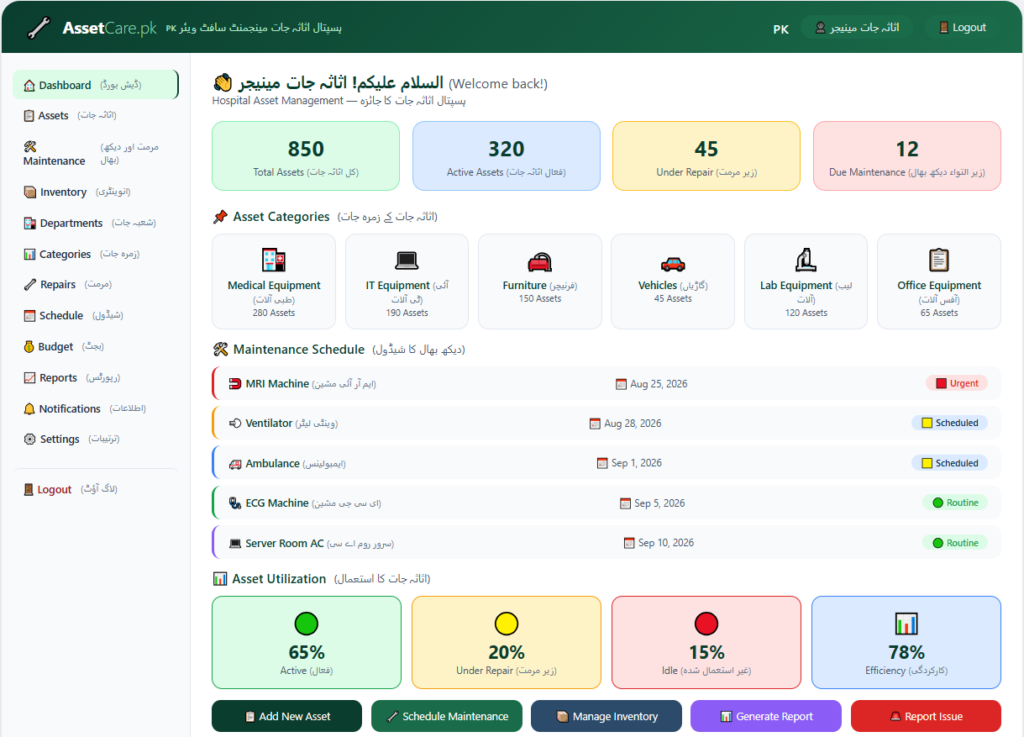
Dashboard
- Display hospital asset management overview and statistics.
- Show total assets, active assets, assets under repair, and assets due for maintenance.
Assets
- Add, edit, and manage hospital asset records.
- Maintain asset details, asset location, department, purchase information, status, and assigned staff.
Maintenance
- Schedule and manage preventive and corrective asset maintenance.
- Track maintenance dates, service history, maintenance costs, and upcoming maintenance activities.
Inventory
- Manage hospital equipment and asset inventory.
- Track available items, issued items, stock levels, equipment usage, and inventory movements.
Departments
- Create and manage hospital departments.
- Assign assets and equipment to relevant departments and track departmental asset usage.
Categories
- Create and manage asset categories.
- Organize assets into medical equipment, IT equipment, furniture, vehicles, laboratory equipment, and office equipment.
Repairs
- Manage damaged and faulty hospital equipment.
- Record repair requests, repair status, service providers, repair costs, and completion details.
Schedule
- Manage asset maintenance and service schedules.
- Schedule inspections, preventive maintenance, equipment servicing, and calibration activities.
Budget
- Manage the hospital asset management budget.
- Track asset purchasing costs, maintenance expenses, repair costs, and allocated departmental budgets.
Reports
- Generate hospital asset management reports.
- Generate asset, inventory, maintenance, repair, utilization, budget, and departmental reports.
Notifications
- Send alerts about maintenance, repairs, inspections, and asset updates.
- Notify departments and staff about upcoming maintenance and important asset activities.
Logout
- Securely log out from the system.Securely log out from the system.