Skip to content
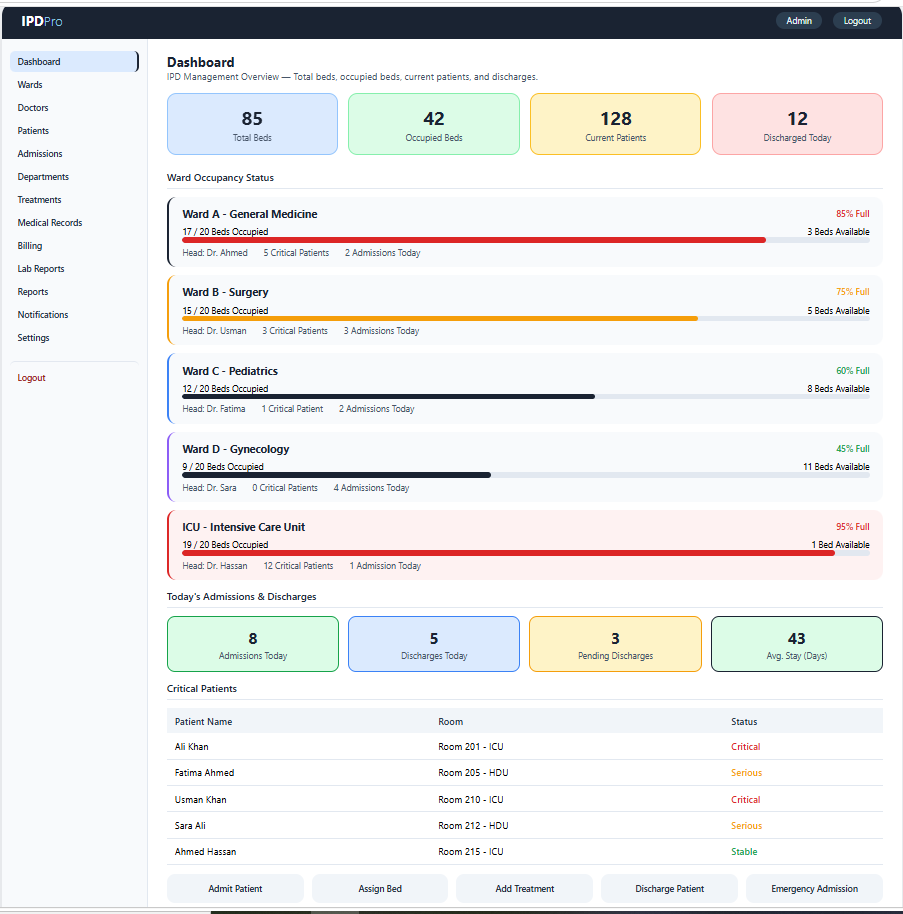
Dashboard
- Display IPD management overview and statistics.
- Show total beds, occupied beds, current patients, and discharged patients.
Wards
- Create and manage hospital wards.
- Monitor bed occupancy, available beds, critical patients, and admissions.
Doctors
- Add, edit, and manage doctor profiles.
- Assign doctors to wards, departments, and admitted patients.
Patients
- Add and manage patient records.
- View patient details, medical history, and current admission status. Admissions
Admissions
- Admit and manage patients in the hospital.
- Record admission details, assigned ward, room, and bed information.
Departments
- Create and manage hospital departments.
- Assign doctors, wards, and patients to relevant departments.
Treatments
- Manage patient treatments and care plans.
- Record diagnoses, procedures, medicines, and treatment progress.
Medical Records
- Manage inpatient medical records and history.
- Maintain diagnoses, prescriptions, test results, and clinical notes.
Billing
- Manage patient billing and hospital charges.
- Track treatment costs, room charges, payments, and outstanding balances.
Lab Reports
- Manage patient laboratory reports.
- Record and view diagnostic tests and laboratory results.
Reports
- Generate IPD management reports.
- Generate admission, discharge, bed occupancy, patient, and billing reports.
Notifications
- Send alerts about admissions, discharges, and patient updates.
- Notify doctors and staff about important patient activities.
Settings
- Configure IPD management settings and preferences.
- Manage hospital information, wards, rooms, beds, and system settings.
Logout
- Securely log out from the system.